09
Oct
2026
GoLibrary: The Best Library Management App in India (2026) – Features, Pricing & Comparison
The Complete Library Management Software for Seats, Shifts, Members, Attendance, Fee Collection, WhatsApp Reminders & Business Growth
Managing a modern study library is about much more than providing a peaceful environment for students. Library owners must manage seat allocations, student memberships, multiple shifts, attendance, fee collections, renewals, expenses, and daily operations.
Handling these tasks manually can become complicated, especially as the number of members increases.
That's why choosing the best library management app in India is an important decision for every study library owner.
GoLibrary is an all-in-one library management application designed specifically for study libraries, reading rooms, self-study centers, coaching libraries, and multi-branch library businesses.
- With 8+ years of industry experience, 100K+ Google Play downloads, a 4.7-star rating promoted by the company, and Android, iOS, and Web availability, GoLibrary offers a comprehensive solution for managing everyday library operations.
- Whether you manage a small reading room with 25 members or a growing library with hundreds of students, GoLibrary helps simplify administration and improve operational efficiency.
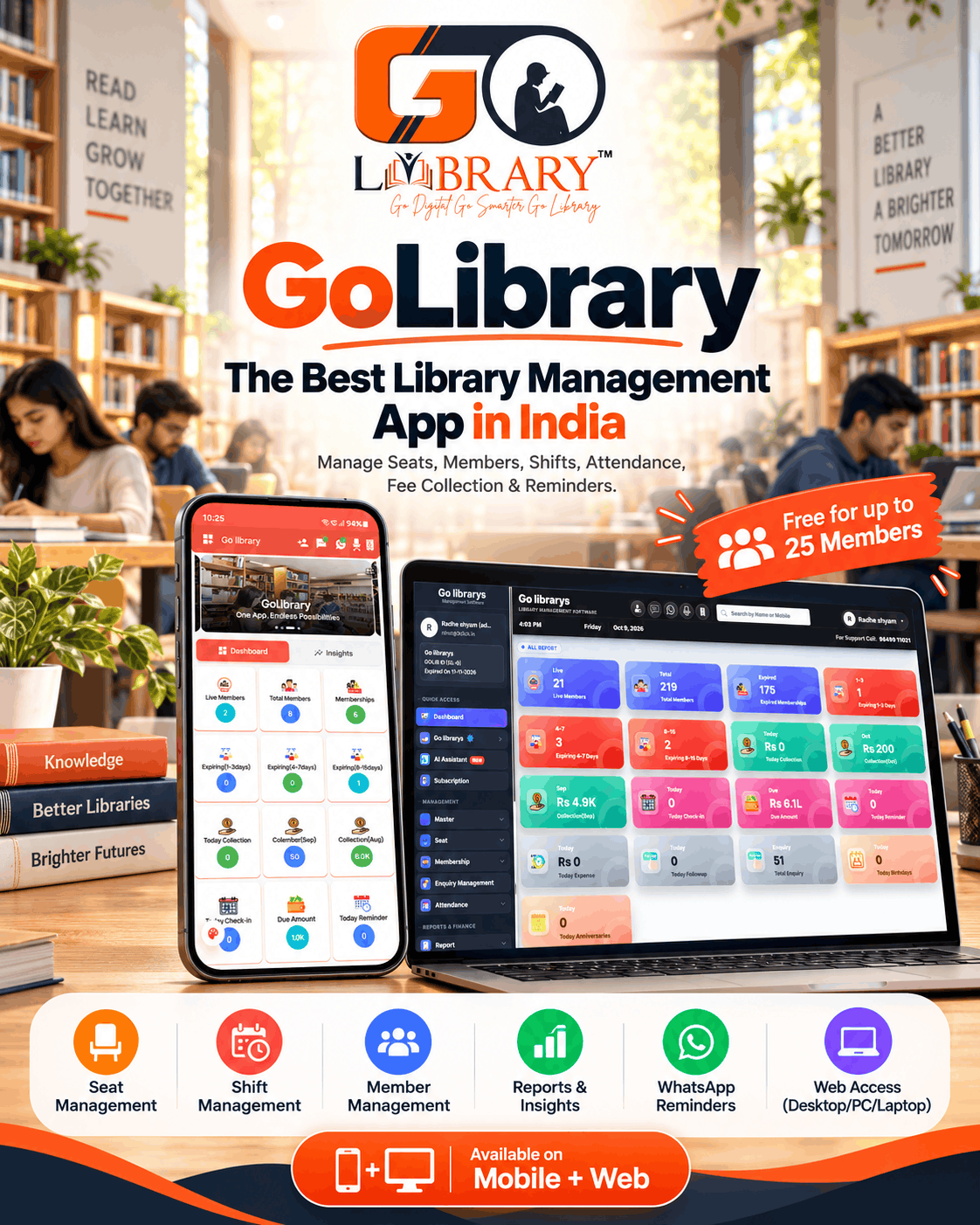
And the best part? GoLibrary offers a free-for-life plan for up to 25 members.
Let's explore its features, benefits, pricing, and how GoLibrary compares with other library management software in India.
What Is GoLibrary?
GoLibrary is a cloud-based study library management software that enables library owners to digitally manage their entire library business from a smartphone, desktop computer, PC, or laptop.
Unlike traditional book management systems used in schools and colleges, GoLibrary is specifically designed for private study libraries where students subscribe to seats for different shifts.
From registering members to allocating seats, tracking attendance, recording payments, sending automated reminders, and monitoring library performance, GoLibrary brings essential operations together in one platform.
What Can You Manage with GoLibrary?
- Smart Seat and Floor Management
- Flexible Shift and Membership Plan Management
- Student and Member Registration
- Attendance and Biometric Integration
- Automated SMS, WhatsApp and Email Reminders
- Fee Collection and Due Payment Tracking
- Membership Renewals and Expiry Alerts
- Multi-Branch Library Management
- Locker and Expense Management
- Enquiry and Staff Management
- AI-Powered Insights and Business Reports
- Compatible Remote Access-Control Systems
One application. Multiple features. Complete control over your library.
Why Do Library Owners Need Library Management Software & App?
Running a library using notebooks, Excel sheets, and manual registers may work initially, but these methods become difficult to maintain as the business grows.
Some common challenges library owners face include:
- Seat Allocation Confusion: Managing different students on the same seat across multiple shifts can lead to booking errors.
- Missed Membership Renewals: Without a proper reminder system, owners may forget to follow up with members whose plans are about to expire.
- Time-Consuming Fee Collection: Tracking paid fees, pending dues, and monthly collections manually requires significant administrative effort.
- Attendance Management: Maintaining daily attendance records manually can be inconvenient and inconsistent.
- Limited Business Visibility: Without proper reporting, it becomes difficult to understand occupancy, revenue, expenses, and membership trends.
- Multiple Branch Challenges: Owners managing several library locations need an organized way to monitor operations.
GoLibrary helps address these challenges with a centralized digital management system.
Top Features of GoLibrary – Smart Library Management Made Easy
1. Smart Seat Management
Seat management is one of the most important features of any study library management application.
GoLibrary provides a visual seat management system that helps library owners monitor available and occupied seats according to membership plans and shifts.
With GoLibrary, you can:
- Add and organize library seats.
- View available and allocated seats.
- Assign seats to registered members.
- Manage seat allocations for different shifts.
- Search for specific seats quickly.
- Organize seating across different floors.
- Reduce seat allocation conflicts.
For example, if your library has 100 physical seats, you can allocate those seats to different members according to morning, afternoon, evening, night, or full-day memberships.
Benefit: Better seat utilization, fewer manual errors, and more organized seating arrangements.
2. Flexible Shift Management
Every student has a different study schedule. Some prefer morning sessions, while others attend in the evening or study late at night.
GoLibrary supports flexible shift management, including:
- Morning Shift
- Afternoon Shift
- Evening Shift
- Night Shift
- Full-Day Plan
Library owners can create membership plans according to their library's operating hours and fee structure.
This makes it easier to organize different membership categories without maintaining separate registers.
Benefit: More effective seat utilization and flexible membership options.
3. Complete Member Management
Managing student information becomes much easier when everything is stored in one organized system.
GoLibrary helps library owners manage important member information, including names, contact details, joining dates, membership plans, assigned seats, payments, renewal history, and expiry dates.
Owners can quickly search and access member information whenever required.
Benefit: Faster registration, easier member tracking, and less paperwork.
4. Automated SMS, WhatsApp and Email Reminders
One of the biggest challenges for study library owners is following up with students for monthly renewals and pending fees.
GoLibrary helps reduce this repetitive work through automated communication features.
You can configure supported reminders for:
- Membership renewal dates.
- Membership expiry alerts.
- Pending fee payments.
- Birthday wishes.
- Anniversary wishes.
- Library announcements and custom messages.
Instead of manually calling every member, library owners can use GoLibrary's communication tools to keep members informed.
Benefit: Better communication, fewer missed follow-ups, and more efficient renewal management.
5. Biometric Attendance Management
GoLibrary supports integration with compatible biometric attendance devices, helping modern libraries improve attendance tracking.
Supported attendance workflows can include:
- Fingerprint attendance.
- Facial recognition attendance.
- RFID and card-based attendance.
- Live attendance records.
- Member entry and exit tracking.
Library owners can review attendance information digitally rather than depending entirely on manual registers.
Benefit: Convenient attendance management and improved visibility into daily member activity.
6. Smart Remote Access Control
For libraries operating long hours or multiple shifts, controlling member access is another important requirement.
With compatible access-control hardware, GoLibrary can help manage library entry based on a member's plan validity and permitted shift timings.
For example, if a student's membership has expired, the configured access-control system can restrict entry according to the library's access rules.
Benefit: More controlled library access with less manual supervision.
Hardware compatibility, installation, and service requirements should be confirmed before enabling biometric or remote access-control features.
7. Fee Collection and Financial Management
Understanding where your library earns and spends money is essential for business growth.
GoLibrary helps owners manage:
- Membership fee collections.
- Payment history.
- Pending dues.
- Renewals.
- Daily and monthly collection reports.
- Operational expenses.
- Financial summaries.
Instead of manually calculating daily earnings, owners can review collection records through the application.
Benefit: Improved financial tracking and more informed business decisions.
8. AI-Powered Reports and Insights
GoLibrary includes AI-powered insights designed to help library owners understand their business performance.
The system can provide useful information about:
- Daily fee collections.
- Member joining and renewal activity.
- Attendance summaries.
- Shift-wise seat utilization.
- Expense tracking.
- Membership expiry information.
- Library performance trends.
These insights can help owners identify business opportunities and operational issues.
Benefit: Better decisions supported by organized business information.
9. Multi-Branch Management
Managing one library is challenging enough. Managing multiple branches requires even better organization.
GoLibrary includes branch management features that help owners maintain records and monitor operations across multiple library locations.
This is particularly useful for library businesses planning to expand into new areas.
Benefit: More centralized management and easier expansion.
10. Locker, Expense and Enquiry Management
GoLibrary offers additional features beyond seat and member management.
- Locker Management: Allocate lockers to members and maintain locker records.
- Expense Management: Record operational expenses such as rent, electricity, maintenance, and other costs.
- Enquiry Management: Record prospective student enquiries and manage follow-up information.
- Staff Management: Organize staff-related records and attendance workflows.
Benefit: Manage more of your library's daily operations through a single platform.
GoLibrary Web Version – Manage Your Library on Desktop, PC or Laptop
One of GoLibrary's important advantages is that it is not limited to a mobile application.
GoLibrary is also available as a Web-based library management software, allowing owners to manage their libraries from desktop computers, PCs, and laptops.
Some library owners prefer mobile applications, while others find it more convenient to work on a larger screen at their reception or office desk.
GoLibrary supports both working styles.
Why Use GoLibrary on a Desktop or Laptop?
Larger Dashboard View
Monitor library records, members, seats, and reports on a larger screen.
Convenient Member Management
Register members, update membership information, and manage daily administrative activities more comfortably.
Seat and Shift Overview
Review seat availability and shift allocations through the Web interface.
Financial Reporting
Access collections, dues, expenses, and business reports from your computer.
Multi-Branch Administration
Manage branch-related operations through a centralized system.
Real-Time Synchronization
GoLibrary promotes synchronized access between its App and Web platforms, helping owners work across supported devices.
Feature-by-Feature Comparison: GoLibrary vs Librify vs Library Pro vs EasyLibrary vs Manual Registers
Choosing the right library management software requires comparing the features that actually matter for your business.
Popular options include GoLibrary, Librify, Library Pro, other library management applications, and traditional manual systems.
The following comparison highlights important capabilities.
GoLibrary – Best for Comprehensive Study Library Management
GoLibrary is a strong choice for library owners who want to manage seats, shifts, members, fee collection, communication, attendance, and reporting in one system.
Its additional emphasis on biometric integrations, remote access control, AI insights, and Android, iOS and Web access makes it particularly attractive to owners seeking a more comprehensive management solution.
Best for: Small and large study libraries, reading rooms, coaching libraries, and growing multi-branch businesses.
Librify – An Alternative for Seat and Membership Management
Librify is designed for private study libraries and offers features such as visual seat maps, QR student registration, attendance, membership tracking, and payment reminders.
Its free plan can appeal to owners looking for an entry-level digital solution, while advanced features are offered through paid subscriptions.
Best for: Study library operators prioritizing QR registration, seat scheduling, and a free starting plan.
Library Pro – Another Library Seating Management Solution
Library Pro provides study library management features including seat booking, QR attendance, fee collection, shift management, WhatsApp integration, and multi-branch management.
Library owners should compare its latest packages, supported integrations, and pricing against their operational needs.
Best for: Owners evaluating seat booking, student attendance, and financial management tools.
EasyLibrary – Check the Specific Product and Plan
Different software products may use similar names such as EasyLibrary.
Before selecting one, check whether the provider supports study library seat allocation, multiple shifts, attendance, automated reminders, reporting, and desktop access.
Best for: Owners evaluating a specific product based on its verified capabilities.
Manual Registers and Excel – Traditional Library Management
Manual registers and spreadsheets may be sufficient for very small libraries with simple operations.
However, as membership increases, updating seats, tracking renewals, calculating collections, and monitoring attendance can require more time and administrative effort.
Best for: Very small operations with limited management requirements.
Which Library Management App Should You Choose?
For owners who simply need a basic digital register, several solutions may be suitable.
But for those looking for a comprehensive management platform with advanced attendance integration, automated communication, operational reports, and Web access, GoLibrary is our recommended first choice.
It combines essential library management functions with tools designed to support long-term business growth.
GoLibrary Pricing – Free for Life for Up to 25 Members
One of the biggest advantages for new library owners is GoLibrary's free entry plan.
GoLibrary advertises a free-for-life plan for up to 25 members.
This means owners of smaller study libraries can begin using the supported features without an initial software subscription fee.
GoLibrary promotes tools including member management, seat management, reminders, locker management, expense management, and reporting as part of its available feature ecosystem.
Some services, integrations, message usage, or Web access may have separate requirements or charges.
Why Is This Useful for New Library Owners?
Starting a study library involves expenses such as rent, furniture, electricity, internet, and other infrastructure.
Having a free software option for a small membership base can help owners digitize their operations without adding another major initial expense.
As the library grows, owners can explore GoLibrary's paid plans for additional member capacity and applicable services.
For current pricing and subscription details, visit https://golibrary.in/.
How to Use GoLibrary – Step-by-Step Guide
Getting started with GoLibrary is straightforward.
Step 1: Download and Register
Visit the official GoLibrary website or download the application from Google Play or the Apple App Store.
Create your account by entering the required registration details.
Step 2: Add Your Library Information
Enter your library name, address, contact information, and other required business details.
Configure your library profile before adding members.
Step 3: Create Seats and Floors
Add the seating arrangement for your library.
Organize seats according to floors or sections, where applicable, to make seat allocation easier.
Step 4: Configure Shifts and Membership Plans
Create the shifts offered by your library.
Set appropriate timings, plan durations, and membership fees.
Step 5: Register Students and Allocate Seats
Add student information, choose the appropriate membership plan, and assign seats based on availability.
Step 6: Manage Attendance and Collections
Begin maintaining attendance information and recording membership fee payments.
Configure compatible attendance integrations if your library uses supported devices.
Step 7: Enable Automated Reminders
Set up the available SMS and WhatsApp notification features to support renewals, pending payments, and member communication.
Step 8: Review Reports and Insights
Use GoLibrary's reports and dashboards to monitor collections, memberships, renewals, attendance, and operational performance.
Step 9: Access GoLibrary on Desktop or Laptop
If you prefer working from a larger screen, use the GoLibrary Web version with the applicable subscription.
You can manage library operations from your PC or laptop while continuing to use the mobile app when needed.
Why Choose GoLibrary Instead of Managing Your Library Manually?
Switching from manual registers to a dedicated library management application offers several practical advantages.
Save Administrative Time
Reduce repetitive work associated with membership records, seat allocation, fee tracking, and renewal follow-ups.
Improve Seat Utilization
View seat availability across shifts and allocate seating more systematically.
Maintain Organized Records
Keep important member and financial information within a centralized digital system.
Improve Member Communication
Use automated reminders and announcements to communicate more consistently with students.
Monitor Financial Performance
Review fee collections, dues, expenses, and reports without relying entirely on handwritten calculations.
Support Business Expansion
Use multi-branch functionality and centralized reporting as your library grows.
Why GoLibrary Is a Strong Choice for Long-Term Library Growth
Choosing software is not just about the features available today. It is also about the reliability, support, and future requirements of your business.
GoLibrary highlights:
Dedicated Support: Assistance for customers using the management platform.
Regular Updates: Continuing improvements to app functionality and user experience.
Security-Focused Management: Centralized digital records and an emphasis on data protection.
Advanced Business Tools: Features extending beyond seats and members into automation, access control, finance, and analytics.
These factors make GoLibrary worth considering for owners who want software that can support their business as it grows.
Frequently Asked Questions About GoLibrary
1. Which is the best library management app in India in 2026?
For private study libraries, GoLibrary is a strong option because it combines seat management, member management, multiple shifts, fee collections, automated reminders, biometric integrations, and reporting.
The best choice depends on your library's size, budget, and specific requirements.
2. Is GoLibrary free to use?
Yes. GoLibrary advertises a free-for-life plan for libraries managing up to 25 members. Certain services, paid plans, or integrations may carry additional charges.
3. Can I use GoLibrary on my desktop, PC or laptop?
Yes. GoLibrary has a Web version for desktop computers, PCs, and laptops. Owners can use the Web dashboard through a supported browser with the applicable subscription.
4. Is GoLibrary available for Android and iPhone?
Yes. GoLibrary promotes both Android and iOS mobile availability, in addition to its Web application.
5. Does GoLibrary support WhatsApp automation?
Yes. GoLibrary offers automated WhatsApp communication features for membership renewals, dues, announcements, and other supported message types.
6. Can I manage multiple shifts in GoLibrary?
Yes. GoLibrary supports morning, afternoon, evening, night, and full-day membership plans.
7. Does GoLibrary support biometric attendance?
Yes. GoLibrary supports integration with compatible biometric devices for fingerprint, facial recognition, and card-based attendance.
8. Can GoLibrary manage multiple library branches?
Yes. GoLibrary includes branch management functionality for library owners who operate multiple study centers.
9. Does GoLibrary help track fee collections and expenses?
Yes. GoLibrary offers collection tracking, financial reporting, expense management, and related operational tools.
10. What is the difference between GoLibrary and Librify?
Both platforms offer solutions for study library management.
Librify emphasizes features such as visual seat maps, QR registration, attendance, and subscription tracking.
GoLibrary offers these broader management categories through its own workflows and places additional emphasis on biometric integrations, access control, AI-powered insights, and cross-platform administration.
Owners should compare current plan details and required integrations to decide which platform is most suitable.
11. Is GoLibrary suitable for a small reading room?
Yes. GoLibrary's free entry plan for up to 25 members makes it an accessible option for smaller reading rooms and newly established study libraries.
12. Can GoLibrary be used for a 24-hour study library?
GoLibrary supports multiple shifts, including night and full-day arrangements. Compatible access-control integrations can also help manage member entry according to configured membership permissions.
13. Do I need technical knowledge to use GoLibrary?
GoLibrary is designed for everyday library administration. Owners can register, configure library details, create plans, add seats, and manage members through the application interface.
Some integrations, particularly biometric devices and access-control systems, may require technical setup.
14. Can I manage my library while travelling?
Yes. With appropriate access and an internet connection, GoLibrary can be used through its supported mobile and Web platforms.
15. How do I get started with GoLibrary?
Visit https://golibrary.in/, choose your preferred platform, register your account, add library information, configure seats and shifts, and begin managing your members.
Final Verdict: Is GoLibrary the Best Library Management App in India?
The best library management software should do more than maintain student records.
It should help you organize your seats, manage shifts, simplify renewals, track financial activity, improve communication, and understand how your library is performing.
GoLibrary brings these important functions together in one comprehensive library management platform.
With seat and member management, biometric attendance integration, SMS and WhatsApp automation, multi-branch administration, reporting, and AI-powered insights, GoLibrary is designed for the practical needs of modern study library owners.
For new library owners, its free-for-life plan for up to 25 members provides an accessible way to begin digital management.
For growing businesses, its wider set of operational tools offers opportunities to improve efficiency and support expansion.
Whether you operate a small reading room, a busy self-study center, or multiple library branches, GoLibrary is a strong platform to consider.